Let’s be honest: Computer-Aided Design (CAD) has a gatekeeping problem. For decades, if you wanted to design a mechanical part, draft a floor plan, or model a complex assembly, you had two choices. You either paid an exorbitant annual subscription to a legacy enterprise giant, or you struggled with clunky, outdated free tools that crashed if you looked at them wrong.
But what is CAD, really?
At its core, it’s just geometry with intent. It’s the digital translation of physical constraints, lines, arcs, extrusions, and tolerances, into data that machines can understand. Whether you’re an engineer designing a bracket for a CNC mill or a developer prototyping a 3D-printed enclosure for your latest project, the math doesn’t change. Only the price tag does.
CAD The Expensive Path
Enterprise CAD suites are expensive not because the software is magically superior, but because of the ecosystem lock-in. You’re paying for legacy codebases maintained since the 90s, massive sales teams, and proprietary file formats designed to keep you trapped.
For many designers, hobbyists, and even small engineering firms, this cost is prohibitive. Worse, these tools often demand heavy hardware resources and constant cloud connectivity, raising valid concerns about data privacy and intellectual property security. When your design files live on someone else’s server, do you really own them?
This is where the landscape is shifting. A new wave of open-source, browser-based, and self-hosted CAD solutions is emerging. These tools aren’t just “free alternatives“; they are architectural re-imaginings of how design software should work. They prioritize local-first execution, privacy, and performance without the bloat.
Web-based CAD Apps!
Why would a developer or designer choose a browser-based or self-hosted solution? Three reasons: control, accessibility, and integration.
First, control. Tools like CAD-Viewer and KulmanLab process DWG and DXF files entirely in your browser. No backend. No uploads. Your data never leaves your device. This is critical for healthcare, defense, or any sector where compliance and privacy are non-negotiable. You get professional-grade dimensioning, layers, and hatching without sending a single byte to the cloud.
Second, accessibility. Not everyone has a $3,000 workstation. Projects like Chili3D and OpenWebCad run efficiently on modest hardware, leveraging WebGL and modern JavaScript frameworks to deliver smooth 60 FPS rendering. You can sketch a floorplan or model a simple part on a Chromebook or a Linux laptop with integrated graphics.
The barrier to entry drops from “buy a new PC” to “open a tab.”
Third, integration. This is where it gets exciting for us developers. Tools like SolidCraft and CADCraft are built in Rust, offering native performance and WebAssembly support. But more importantly, they are designed for the modern stack. SolidCraft, for instance, includes an MCP (Model Context Protocol) server, allowing AI agents to interact with your models directly.
Imagine an AI assistant that can adjust parameters in your parametric timeline or run stress tests via API calls. This isn’t science fiction; it’s happening now.
If you need programmatic control, cadquery2web lets you self-host a CadQuery instance. You write Python code, the server validates it for security, and returns an STL or STEP file. It’s perfect for CI/CD pipelines where you want to generate 3D assets automatically from code commits. Meanwhile, MxCAD offers a lightweight, WebAssembly-based approach for viewing and editing converted .mxweb files, stripping away the heaviness of traditional DWG parsers.
For those who miss the classic command-line workflow, CADCraft delivers a pure Rust experience that feels like AutoCAD but runs anywhere, macOS, Windows, Linux, or FreeBSD. It supports native DXF/DWG handling without Electron bloat, proving that speed and familiarity can coexist in open source.
We are no longer forced to choose between expensive proprietary locks and broken free tools. We have options that respect our hardware, our privacy, and our workflows. Whether you need a quick SVG export from OpenWebCad, a robust parametric modeler in SolidCraft, or a secure, serverless viewer like CAD-Viewer, the power is back in your hands.
The future of CAD isn’t about bigger subscriptions. It’s about smarter, lighter, and more open tools that let you design without limits. Stop renting your creativity. Start building it locally.
Here we start!
1- Chili3D
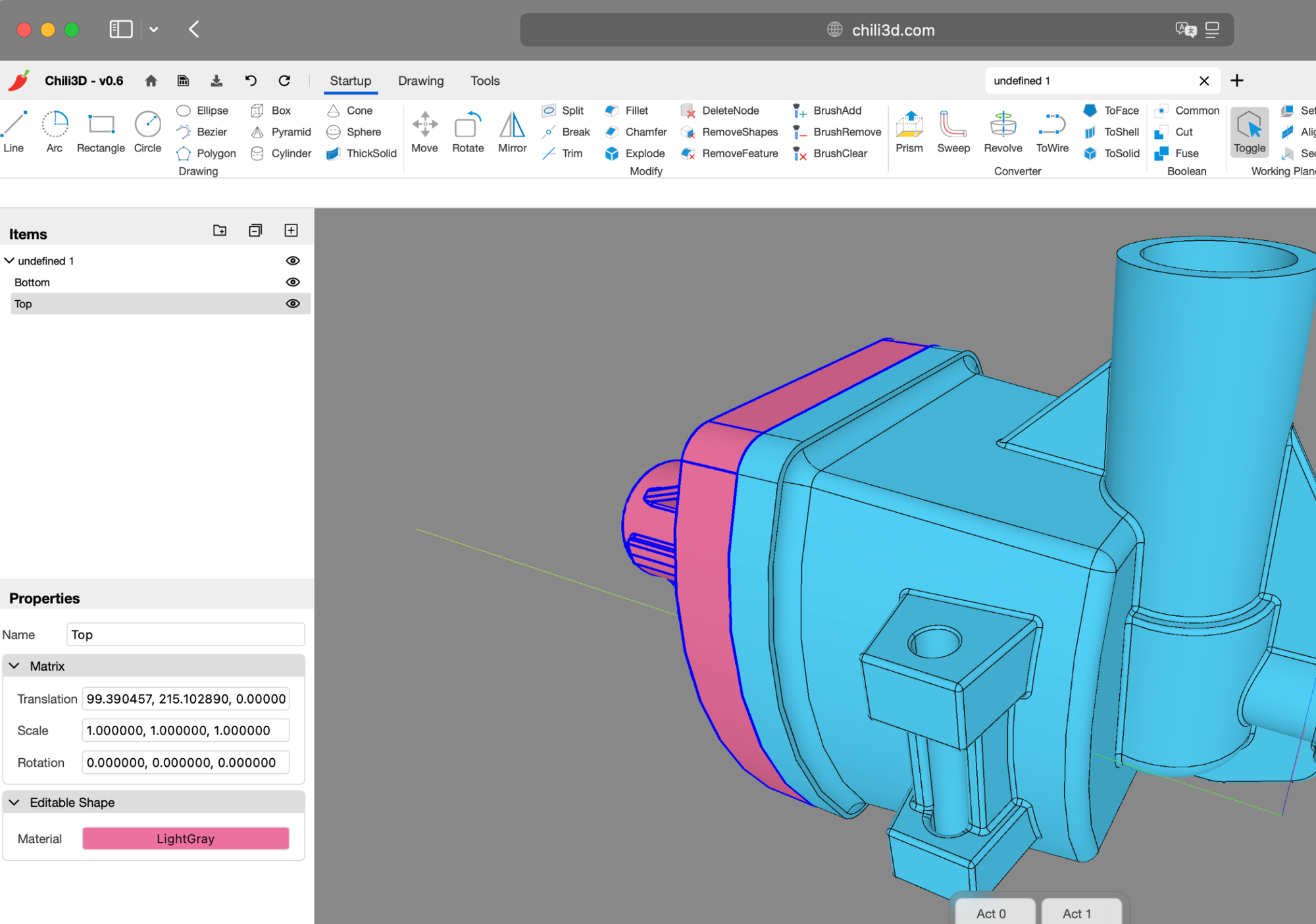
Chili3D is a free and open-source browser-based 3D CAD app that runs with the lowest resources on your browser. It supports all modern browsers such as Google Chrome, Safari, Opera, Mozilla Firefox, and Edge. We have written a quicl snap review about it, that display of its amazing features, you can read about is here.
2- CADmium (inactive yet works)
While it is held in an inactive mode, it is still usable, and used by many designer to share and view their CAD build designs.
3- cadquery2web
Self-hosted web interface for running CadQuery remotely, enabling STL/STEP generation and 3D preview without local installation.
Uses Docker containers with security validation to safely execute code and serve models via a browser-based three.js viewer.
4- CADAM (CAD with AI)
CADAM turns plain English and images into parametric OpenSCAD models instantly in your browser. No installs, just WebAssembly power. Tweak dimensions with interactive sliders, export to STL/DXF, and leverage BOSL libraries. It’s AI-driven generation that keeps you in control, delivering complex assemblies like V8 engines from simple text prompts.
5- CAD-Viewer
CAD-Viewer is a serverless, browser-native DWG/DXF editor that processes files locally for privacy and exports self-contained HTML snapshots.
CAD Viewer Features
- High-performance viewing of large DWG/DXF files with smooth 60+ FPS rendering
- No backend required – Files are parsed and processed entirely in the browser
- Enhanced data security – Files never leave your device, ensuring complete privacy
- Easy integration – No server setup or backend infrastructure needed
- Modular architecture for seamless third-party integration
- Mobile layout & touch — Responsive phone/tablet UI and touch gestures (pinch-to-zoom, single-finger pan, tap to select) built into
@mlightcad/cad-simple-viewer, so mobile browsers work without a separate app - Export to offline HTML — Export the current drawing as one self-contained
.htmlfile with an embedded viewer (pan/zoom, zoom extents, layers, distance measure, EN/ZH UI). Opens offline in any browser; no cad-viewer instance or backend required. - Offline and online editing workflows
- THREE.js 3D rendering engines with advanced optimization techniques
- Designed for extensibility and integration with platforms like CMS, Notion, and WeChat
6- CADCraft
CADCraft is a pure Rust, open-source 2D/3D CAD tool with native DXF/DWG support and a familiar command-line workflow.
Run it locally on macOS, Windows, Linux, or in-browser via WebAssembly for fast, agent-drivable drafting without Electron bloat.
7- MxCAD
MxCad is a WebAssembly library for viewing and editing .mxweb files, a lightweight format converted from DWG/DXF.
It pairs with the mxdraw toolkit to handle conversion, enabling browser-based CAD manipulation without heavy desktop software.
8- KulmanLab
KulmanLab is a free, browser-based 2D CAD editor for DXF files that requires no installation or server uploads. It offers professional drawing tools, dimensioning, layers, and hatch patterns for engineers and makers working entirely client-side.
Included features are:
- DXF import/export (AC1032) with local IndexedDB storage
- Full toolkit: lines, polylines, arcs, circles, ellipses, splines
- Grip editing and object snaps (endpoint, intersection, perpendicular)
- Complete dimensioning: linear, aligned, radius, diameter, angular
- Layer management: freeze, lock, isolate, color, linetype, lineweight
- Hatch fills: built-in ANSI31 patterns plus custom .pat upload
- Multileader annotations with customizable arrowheads
- Undo/redo history, print/PDF export, dark/light themes
- Runs in any modern browser—no plugins, accounts, or uploads
9- Canvas Drawing Application (OpenWebCad)
This React-based web app delivers a fullscreen canvas for precise technical drawing. Create lines, polylines, rectangles, polygons, circles, ellipses, arcs, splines, and text with ease. It includes tools as modify, select, or erase shapes intuitively. Add dimensions, hatches, boundaries, and even embedded images.
You can export your work as clean SVG files. It’s a lightweight, browser-native tool for quick floorplans, diagrams, or geometric sketches without heavy CAD overhead. Simple, fast, and entirely client-side.
10- SolidCraft
SolidCraft is a pure Rust, open-source parametric CAD tool. Sketch, constrain, and build solids with an editable timeline. Run it on desktop, web, or via MCP for AI agents. It handles sketches, features, assemblies, and parameters, offering precise, local-first modeling without cloud dependency.
11- Open CAD Studio
Open CAD Studio delivers native DWG/DXF editing without conversion headaches. Built in Rust, this open-source powerhouse unifies desktop and web workflows for precise 2D drafting and solid modeling.
You will enjoy professional-grade tools, layers, blocks, dimensions, and object snaps, in a fast, cross-platform environment. It’s the serious, privacy-focused alternative for technical drawing that respects your data and runs efficiently anywhere. It supports dozens of CAD formats such as DWG, DXF, BAK, STL, STEP AP203, and many more.