Figma dominates the design world, no doubt. Its ecosystem is massive, the community resources are endless, and for many teams, it’s the default. But let’s be honest: it’s not free, it’s not private, and your data lives on someone else’s server. For developers who value local-first workflows, data sovereignty, and true ownership, that’s a non-starter.
Why open-source alternatives?
We need open-source alternatives because design shouldn’t be locked behind a subscription or a cloud wall. When you’re building privacy-focused healthcare tools, local AI assistants, or secure enterprise systems, sending sensitive wireframes and user flows to a third-party SaaS is a risk we can’t ignore. Open-source tools give you control. You host it, you own the data, and you integrate it directly into your local development environment without API keys or usage limits.
Who is using these alternatives?
It’s not just hobbyists. It’s serious developers, security-conscious enterprises, and teams building on-premise infrastructure who need design tools that respect their boundaries. It’s for those of us who believe that creativity shouldn’t come at the cost of privacy. If you’re tired of renting your workflow, it’s time to look at what’s available when you take back control.
1- Open-Design-Studio
Open Design Studio is a local-first desktop workbench that pairs an AI designer directly with your codebase. It drafts real HTML, CSS, and JS into an isolated .design/ folder, ensuring your source code remains untouched and private.
The interface features an infinite canvas for side-by-side comparison of multiple design variants, offering Figma-like pan, zoom, and inline editing capabilities. This bridges the gap between static mockups and functional code, enabling rapid, secure iteration without cloud dependencies or fragile plugin outputs.
Open Design Studio Features
- Watch ideas come to life instantly: Just describe what you want, and your AI design partner (Claude Opus or GPT) crafts clean HTML/CSS that renders right before your eyes.
- Compare styles side-by-side: Explore 3 unique design moods (subtle, balanced, or daring) on an infinite, Figma-style canvas where you can freely pan and zoom around.
- Works right alongside your workflow: Link your project folder so the AI writes directly to your files, while any quick changes you make in VS Code flow seamlessly back into your chat.
- Click, chat, and refine: Spot something you want to change? Simply point at any element, leave a quick note, or edit the text inline just like a shared doc.
- Easy visual tweaks: No need to dig through stylesheets for tiny tweaks. Drag intuitive sliders or pick colors visually, and the code updates itself on the fly.
- Speedy keyboard shortcuts: Tap
⌘Kto open a quick finder that lets you hop between files, chats, and actions without ever leaving your keyboard. - Real, reliable developer tools: Under the hood, your assistant uses trustworthy tools like atomic multi-file patching, fast search, and line-numbered reads so nothing gets misplaced.
- Smarter, wallet-friendly chats: We keep conversations lightweight and clean by trimming noisy logs and skipping repeat reads, saving you around $1 every turn.
- Your keys stay safe and sound: We never store sensitive credentials in a browser cache. Your API keys rest safely inside your computer’s built-in secure vault (macOS, Windows, or Linux).
- Zero mess, zero stress: The AI only writes into a dedicated
.design/folder, meaning your core codebase stays untouched, protected, and completely safe.
2- Better Design: Open source Claude Design
Better Design is an open-source MCP server injecting real design systems (tokens, components, a11y rules) into AI coding agents. It transforms vague prompts into polished, production-ready UIs by providing semantic CSS and visual guardrails for Cursor, Claude Code, and VS Code.
It also Enables self-review workflows where agents check WCAG compliance and design consistency before handoff, eliminating generic “AI-looking” interfaces.
3- Girda
Grida is a high-performance, canvas editor powered by a Rust-based graphics engine (Skia + WASM) with headless rendering capabilities. It features a stable FlatBuffers document format, seamless Figma/SVG interoperability, and integrated Database/CMS functionality via Supabase.
Girda is designed for developers, it offers both DOM and Skia renderers, enabling efficient workflows for HTML/CSS design and automated CI/export pipelines.
It is released as an open-source project under the Apache-2.o License
4- Open CoDesign
Open CoDesign is a self-hosted project that lets you generate polished prototypes locally using the models you already pay for. It’s a privacy-first, MIT-licensed alternative to Claude Design that supports BYOK for any provider, keeping your data off cloud servers.
It is built for developers who want rapid AI iteration without subscription lock-in, it turns prompts into runnable artifacts in under 90 seconds.
You can download it for macOS, Windows and Linux systems.
5- OpenDesign
OpenDesign transforms your local CLI into a design engine, replacing closed cloud tools with an open, agent-native workflow that reads DESIGN.md systems. Basically, it bypasses pixel-pushing for real CSS and component artifacts, delivering runnable HTML, PDF, and PPTX outputs directly from your preferred coding agents.
It Supports DeepSeek Harness and 26+ local executors, it ensures sandboxed, private prototyping without relying on external servers or proprietary lock-ins.
This is the best open-source Figma alternative for the agent era: functional skills, composable plugins, and brand-grade consistency built entirely on your own hardware.
It supports Claude Code, Raven, OpenCode, OpenClaw, Cline, Kiro, Hermes Agent and a dozen more alternative.
You can download it for Apple Silicon, Apple Intel, Windows, and Linux.
6- Open Pencil
OpenPencil is a privacy-first, open-source design editor that reads native .fig files and integrates AI agents via MCP. Built with Tauri for efficiency, it offers local vectorization, design-to-code export, and serverless P2P collaboration.
Open Pencil is an ideal option for developers seeking a programmable, self-hosted alternative to cloud-dependent design tools without compromising on performance or data sovereignty.
Open Pencil’s Features
- Opens
.figand.penfiles: read and write native Figma files, open supported Pencil documents from the app or OS file browser, copy & paste nodes between apps - AI builds designs: describe what you want in chat, 100+ tools create and modify nodes. Connect OpenRouter, Anthropic, OpenAI, Google AI, DeepSeek, Z.ai, MiniMax, or compatible endpoints
- Fully programmable: headless CLI, XPath queries, Figma Plugin API via
eval, MCP server for AI agents, and desktop agent integrations for Claude Code, Codex, and Gemini CLI - Lint, convert, and extract tokens: inspect documents, lint naming/layout/accessibility, convert between supported formats, analyze colors/typography/spacing/clusters, and extract design tokens
- Components and variants: create reusable components, group variants into component sets, insert local assets as instances, and switch variants from the inspector
- Image vectorization: convert image layers into editable vector layers with Recraft or fal.ai
- Design-to-code export: export selections as JSX/Tailwind, generate token outputs, and map designs into component-oriented code workflows
- Vue SDK for custom editors: headless components and composables for embedding OpenPencil into other apps or building workflow-specific editing surfaces. Read the SDK docs →
- Real-time collaboration: P2P via WebRTC, no server, no account. Cursors, presence, follow mode
- Auto layout & CSS Grid: flex and grid layout via Yoga WASM, with gap, padding, alignment, track sizing
- ~15 MB desktop app: Tauri v2 for macOS, Windows, Linux. Also runs in the browser as a PWA
7- Penpot
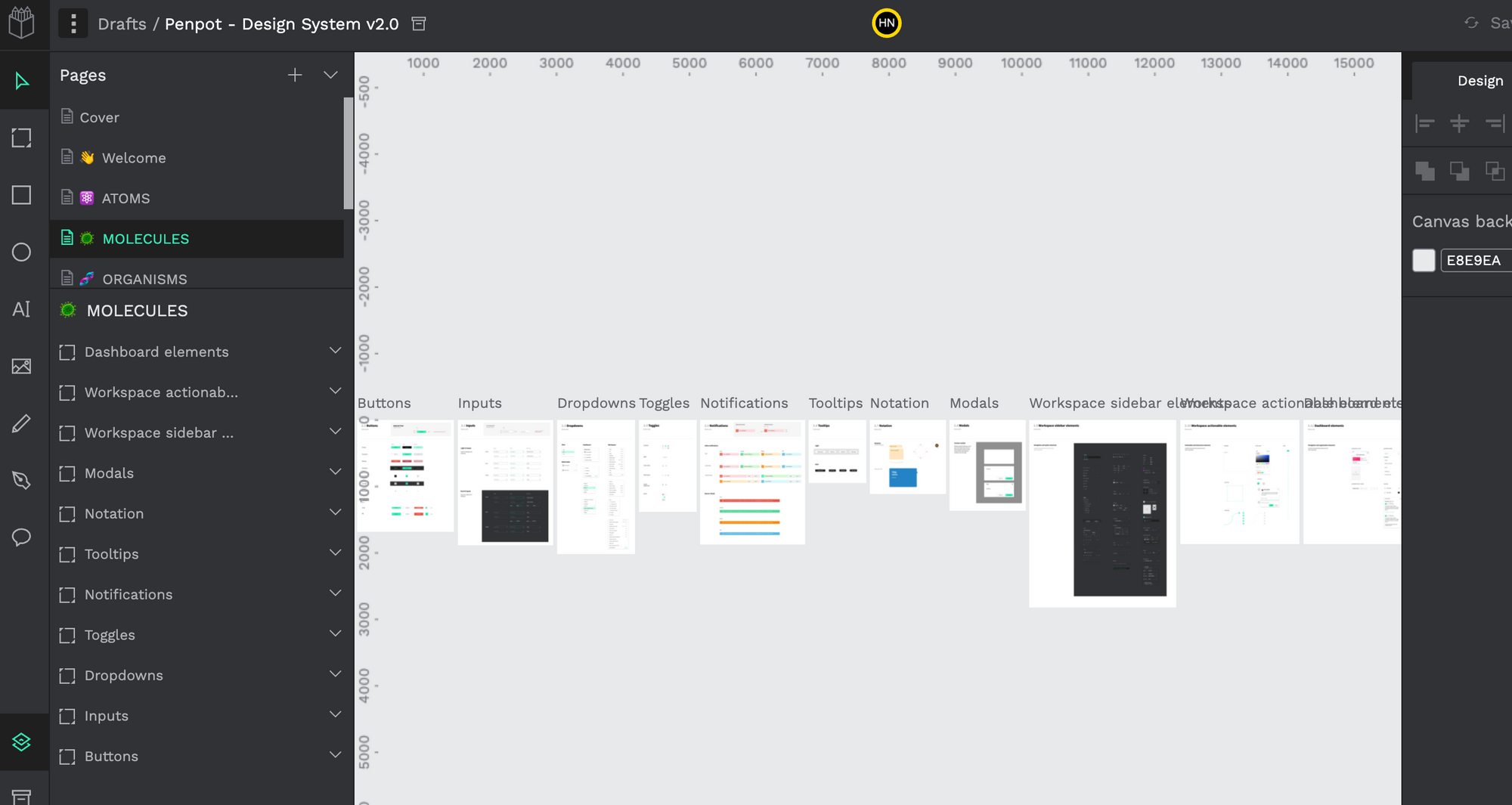
Penpot is your self-hosted Figma style alternative design that is designed for teams of design and UI/UX specialists to work together in a collaborative projects. Agencies can install it locally, or on a server for better remote work. I personally have a version that I use locally as I run it through Docker.
Now Penpot AI offers an AI approach for better generative experiance that you can use it within Penpot setup as your own personal AI design assistant.